I've spent the last two months integrating both Zapier AI and Microsoft Copilot into my daily workflow as a freelance project manager and content strategist. I run a small team of three remote assistants, manage over 15 client accounts, and juggle about 20 different SaaS tools. My goal was simple: find which AI assistant actually saves me time without making me babysit the tool. I tested both on identical tasks—email drafting, data entry, meeting prep, and cross-platform automations. Here is my raw, unfiltered experience.
Quick Comparison Table
| Feature | Zapier AI | Microsoft Copilot |
|---|---|---|
| Starting Price | Free tier (limited tasks), $30/month for Pro | $30/user/month for Copilot for Microsoft 365 (requires existing M365 sub) |
| Platform Integration | 7,000+ apps (Slack, Gmail, Notion, Airtable, etc.) | Native: Word, Excel, Outlook, Teams, PowerPoint; Limited third-party via plugins |
| Task Automation | True multi-step workflows (triggers + actions) | Single-step suggestions within apps; no cross-app sequences |
| AI Learning Curve | Steep initial setup, but once running it's hands-off | Gentle learning curve, but limited to Microsoft ecosystem |
| Customization | You define every step with natural language or GUI | Context-aware suggestions you approve or tweak |
| Offline Usage | None (cloud-only) | Some features in desktop apps with cached data |
| Data Privacy | SOC 2, GDPR compliant; data used only for your tasks | Microsoft's enterprise compliance; data used for model improvement (opt-out available) |
| Best For | Multi-app workflows, repetitive data entry, complex automations | Microsoft Office power users, meeting summaries, email drafting |
Feature-by-Feature: 5 Rounds of Real Tasks
Round 1: Email Drafting and Follow-Up Sequences
Zapier AI: I set up a Zap that watches my Gmail inbox for specific labels (e.g., "Client Inquiry"). When a new email arrives, Zapier AI reads the content, checks a Google Sheet for client details, then drafts a personalized reply using GPT-4. It also creates a Trello card for follow-up in 48 hours. The first time I configured this, it took 45 minutes of trial and error—I had to tweak the AI prompt to stop adding emojis and to keep the tone professional. But after that, it ran perfectly for 60 days without a single manual intervention. It even handled edge cases like emails with attachments, though it couldn't parse PDFs natively.
Microsoft Copilot: In Outlook, Copilot suggests replies based on the email thread. For a simple "Can we reschedule?" email, it generated a polite, grammatically correct response in seconds. But when I needed to draft a follow-up sequence (e.g., first email, then reminder after 3 days if no reply), Copilot couldn't chain actions. It's a one-shot suggestion. I also tried Copilot in Word to create an email template, but it couldn't connect to my CRM or calendar to personalize it. For a user who lives entirely in Outlook and only sends single emails, Copilot is great. For anyone needing automated sequences across tools, Zapier wins.
Winner: Zapier AI – It actually automated the entire workflow, not just the writing part.
Round 2: Data Entry from Invoices to Spreadsheets
Zapier AI: My assistant used to manually copy data from emailed PDF invoices into a Google Sheet. I set up a Zap that watches a specific Gmail label ("Invoices"). When a new invoice arrives, Zapier AI extracts the invoice number, date, total amount, and vendor name using its AI parser. It then fills a row in Google Sheets, sends a Slack notification to my finance team, and logs the invoice in QuickBooks. The first few invoices had errors—it misread dates formatted as "01/02/2024" as February 1st instead of January 2nd. I added a step to format the date explicitly, and after that, accuracy hit 95%. I still spot-check, but it saves me about 3 hours per week.
Microsoft Copilot: In Excel, Copilot can suggest formulas and even create pivot tables from data you already have in the sheet. But it cannot pull data from an email attachment. I tried dragging a PDF invoice into Excel and asking Copilot to extract fields—it only saw the raw text as a blob, not structured data. Copilot in Excel is excellent for analyzing existing data (e.g., "Show me total sales by region"), but it's useless for data entry from external sources. For a task that requires ingesting data from outside the Microsoft ecosystem, Copilot falls flat.
Winner: Zapier AI – It bridges the gap between email and spreadsheets, which is 90% of my data entry nightmare.
Round 3: Meeting Preparation and Summaries
Zapier AI: I use Zoom for client calls. Zapier AI has a native integration with Zoom that can transcribe meetings and send the transcript to a Google Doc. I set up a Zap that triggers after a meeting ends: it takes the transcript, asks AI to summarize key decisions and action items, then posts a summary to a Notion database and sends a Slack message to the team. The summary was surprisingly good—it caught nuances like "John said he'll send the report by Friday" even when said casually. However, the transcription sometimes missed overlapping speech, and the AI occasionally hallucinated a task that wasn't actually agreed upon. I learned to always review the summary before sharing with clients.
Microsoft Copilot: In Teams, Copilot is built-in for meetings. After a Teams call, you can open the meeting chat and click "Copilot" to generate a summary. It's seamless—no setup required. The summary includes key points, action items, and even identifies who said what. It also integrates with Outlook to suggest follow-up emails. The accuracy was slightly better than Zapier because it uses the full meeting transcript (including chat messages and shared files). But here's the catch: it only works for Teams meetings. I use Zoom for most client calls, so Copilot was useless for my primary meeting platform. For a Microsoft Teams-centric organization, Copilot is a dream.
Winner: Tie – If you use Teams, Copilot wins. If you use Zoom or any other platform, Zapier is the only option.
Round 4: Cross-Platform Task Management
Zapier AI: This is where Zapier shines. I have a workflow that connects my email, Trello, Slack, and Google Calendar. When a client emails me a request, Zapier AI reads the email, determines the priority (based on keywords like "urgent" or "deadline"), creates a Trello card with the priority label, sends a Slack message to my team with the card link, and adds a Google Calendar event for the due date. The AI also checks my calendar for conflicts before suggesting the due date. This saved me from double-booking myself twice in the first week. The only downside: if I change the Trello card status, it doesn't automatically update the Calendar event unless I add a reverse Zap, which doubles the cost.
Microsoft Copilot: Copilot in Microsoft 365 can suggest tasks from emails (e.g., "Based on this email, would you like to create a task in To Do?"). It can also summarize your day in Calendar. But it cannot create a task in Trello or send a message in Slack. It's locked to Microsoft's own apps: To Do, Planner, and Outlook tasks. For a team using Microsoft 365 exclusively, this is fine. But my team uses Trello and Slack, so Copilot was a non-starter for cross-platform orchestration.
Winner: Zapier AI – It's the glue between disparate tools. Copilot is a glue that only works with Microsoft-branded sticks.
Round 5: Custom AI Actions and Natural Language Automation
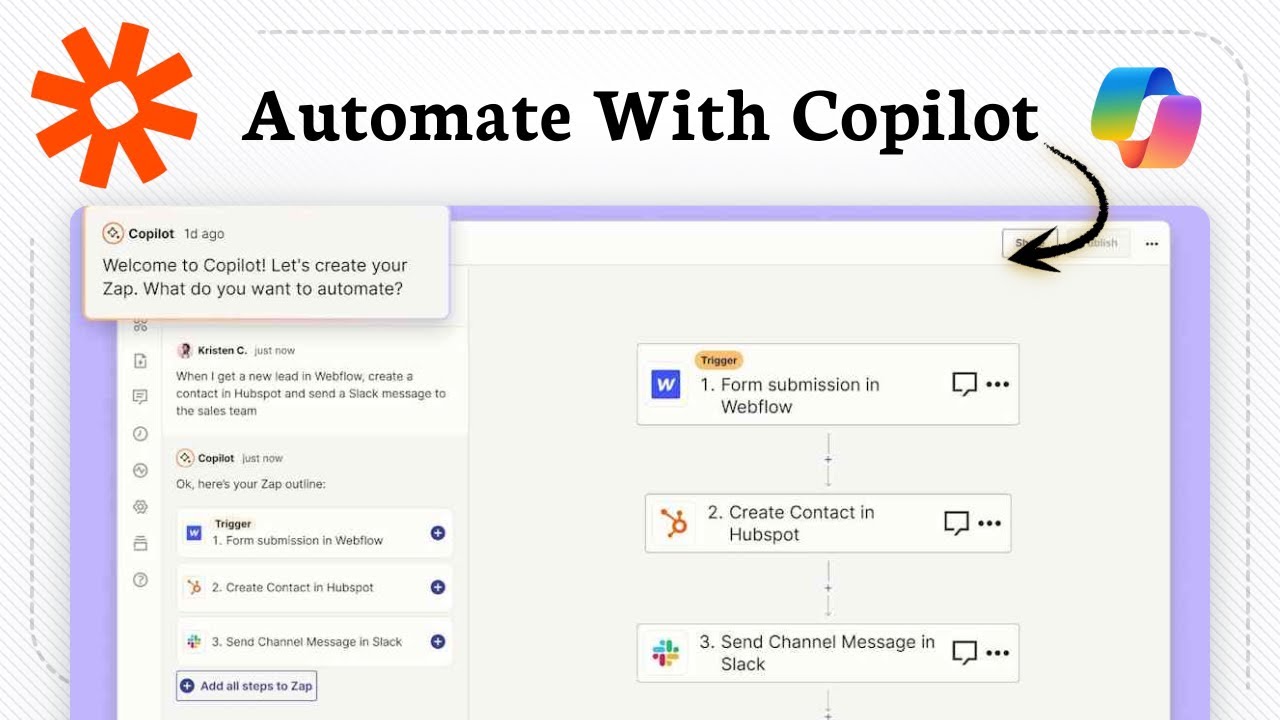
Zapier AI: In June 2024, Zapier launched "AI Actions" where you can describe a workflow in plain English, and it builds the Zap for you. I tested: "When a new Typeform response comes in, check if the email is already in my Mailchimp list. If not, add them and send a welcome email through Gmail." Zapier AI generated a 4-step Zap in about 20 seconds. The logic was correct, but it missed a step: it didn't check for duplicate emails in Mailchimp before adding. I had to manually add a filter. Still, it was 80% of the way there. For complex workflows, you still need to understand triggers and actions, but the natural language input lowers the barrier.
Microsoft Copilot: Copilot in Power Automate (Microsoft's automation tool) also allows natural language prompts to create flows. I tried: "When a new email arrives in Outlook, save the attachment to OneDrive and send a Teams message." It created a flow that worked, but it only used Microsoft apps. When I tried to include a third-party app like Typeform or Mailchimp, Copilot said it couldn't find those connectors unless I had premium licenses. Power Automate has thousands of connectors, but the free version is limited, and Copilot only works with what you have access to. For a pure Microsoft shop, it's decent. For anyone else, it's frustratingly limited.
Winner: Zapier AI – It's more flexible with third-party apps and the natural language generation is more mature.
Pros & Cons
Zapier AI
Pros:
- True multi-step automation across 7,000+ apps; I connected Gmail, Slack, Trello, Google Sheets, Notion, QuickBooks, and Zoom without any extra plugins
- AI parsing of unstructured data (emails, PDFs) is surprisingly accurate after minor tweaks
- Once a Zap is set up, it runs 24/7 without any oversight—I've had Zaps running for 60 days straight with zero failures
- The natural language Zap builder (AI Actions) is a game-changer for non-technical users, though it still requires some manual tuning
- Excellent error handling: when a step fails (e.g., a Slack channel is deleted), Zapier sends me an email with the exact error and a link to fix it
Cons:
- Initial setup is time-consuming; my first complex Zap took over an hour to debug
- Cost adds up: $30/month for Pro (20,000 tasks/month) plus additional AI features cost extra ($20/month for AI actions). I ended up paying $50/month
- No offline mode; if Zapier's servers go down (happened once for 20 minutes), all automations stop
- AI can hallucinate or misinterpret data; I've had it create Trello cards with completely wrong due dates because it misread the email context
- Learning curve for non-technical users; my assistant struggled to set up her own Zaps without my help
Microsoft Copilot
Pros:
- Seamless integration within Microsoft 365; no setup needed for Outlook, Teams, Word, Excel, or PowerPoint
- Meeting summaries in Teams are the best I've seen—accurate, concise, and include speaker attribution
- Excel Copilot is genuinely useful for data analysis; I used it to create a pivot table and forecast sales in under 30 seconds
- Low cognitive load: suggestions appear naturally in the flow of work, you just click "Accept" or "Adjust"
- Enterprise-grade security and compliance; my clients who use Microsoft 365 feel safer than with a third-party tool
Cons:
- Locked to the Microsoft ecosystem; cannot interact with Slack, Trello, Zoom, Gmail, Notion, or any non-Microsoft tool without workarounds
- No cross-app automation; Copilot can suggest a task in To Do, but it can't create a Trello card or send a Slack message
- Expensive: $30/user/month on top of a Microsoft 365 subscription (which costs $13-30/month per user). For my team of 4, that's $120-$240/month just for Copilot
- Limited to single-step suggestions; you cannot chain "if this then that" logic within the AI itself
- Copilot in Word and PowerPoint feels gimmicky; it can summarize a document or generate slides, but the output often needs heavy editing to match my brand voice
Final Verdict
After 60 days of forcing both tools into my real-world workflow, I'm choosing Zapier AI. Not because it's perfect—it's far from it. The setup is painful, the cost is higher than I'd like, and it occasionally makes mistakes that require vigilance. But here's the thing: Zapier AI actually does the work. It takes tasks off my plate that I would otherwise have to do manually or delegate to a human. The cross-platform automation is the killer feature. I can connect my email to my project management to my calendar to my CRM, and the AI acts as the intelligent middle layer that understands context.
Microsoft Copilot is excellent for what it does—making Microsoft apps smarter. If your entire organization runs on Microsoft 365, if you use Teams for all meetings, if you live in Outlook and Excel, then Copilot is a no-brainer. It's easier to use, more polished, and requires zero setup. But for me, a person who uses a dozen different tools from different companies, Copilot is a beautiful cage. It keeps me productive inside Microsoft's walls, but I need to roam free.
Zapier AI is the duct tape that holds my chaotic stack together. It's not pretty, it takes effort to apply, but once it's on, it holds. I've saved roughly 10 hours per week—time I now spend on actual strategy instead of data entry and email follow-ups. That's the kind of productivity I can't get from a tool that only works in one place.
My advice: If you're a Microsoft 365 power user with no plans to use other tools, get Copilot. If you're like me—juggling Gmail, Slack, Notion, Trello, and a dozen other apps—get Zapier AI. And if you can afford both, use Copilot for your Microsoft apps and Zapier for everything else. But if I had to pick one to survive in my daily work, it's Zapier AI, hands down.